

- How to install mobile Suica on iPhone?
- Can foreigners use Mobile Suica?
- How do I pay with Mobile Suica in Japan?
- What is the difference between Suica and Mobile Suica?
- Can tourists use Mobile Suica?
Mobile Suica is a convenient digital version of the Suica card, allowing you to use your smartphone for transportation and purchases across Japan. It simplifies daily travel on trains, buses, and even allows payments at convenience stores and vending machines.
However, the installation process can be challenging for foreigners due to incomplete English support.
This guide provides clear, step-by-step instructions in English to help you easily install and start using Mobile Suica on your iPhone.
How to make Suica App on iPhone in English?
What is Mobile Suica?
Mobile Suica is a digital version of the Suica card that you can use on your smartphone. It offers the same convenience as a physical Suica card but with additional benefits like easier recharging and management.
Why You Should Use Mobile Suica:
- Ease of Issuance: Currently, issuing new physical Suica cards is not possible, making Mobile Suica the best alternative. Mobile Suica can be issued for free on your existing smartphone.
- Cost-Effective: Issuing Mobile Suica on your phone incurs no cost, making it a budget-friendly choice.
- Long-Term Use: Unlike Welcome Suica, which is intended for short-term visitors and valid for only 28 days, Mobile Suica is perfect for long-term residents in Japan.
- Convenience: With Mobile Suica, you can easily recharge your balance anytime using your phone, track your spending, and avoid carrying a physical card.
Welcome Suica is made ONLY for tourists:
- Limited Validity: Welcome Suica is valid for only 28 days, making it suitable only for short-term visitors.
- No Refunds: If you mistakenly purchase a Welcome Suica without realizing its limitations, you cannot get a refund. Many users find themselves unable to use it as they had initially intended.
- Misunderstanding Risk: Some foreigners may purchase a Welcome Suica without understanding these conditions, only to later realize it is not suitable for long-term use.
By choosing Mobile Suica, you bypass the limitations of physical Suica cards and the temporary nature of Welcome Suica. Mobile Suica provides a seamless and efficient way to manage your transportation and purchases in Japan.
English Guide on How to Make the Mobile Suica App Work on iPhone
There are several ways to start using the mobile suica on your phone, but I will explain the most convenient ways to install.
Tips and note how to use Mobile Suica in Japan
- Using Wallet App in your iPhone
- You do not need to add your personal details (If you register by using Suica App, you have to)
- You can use your registered credit cards on your Wallet App
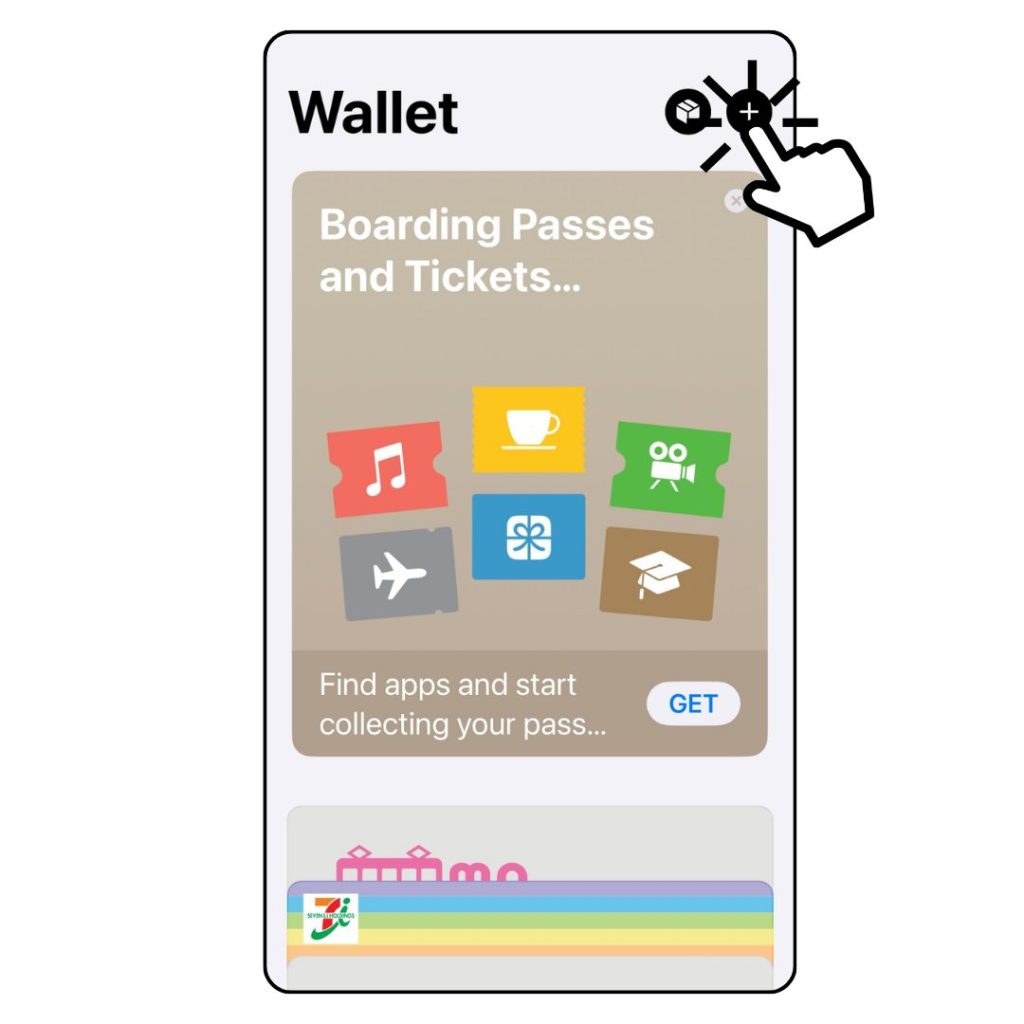
1. Open Wallet App and Click +
Open the Wallet app on your iPhone and tap the plus sign (+) to add a new card.
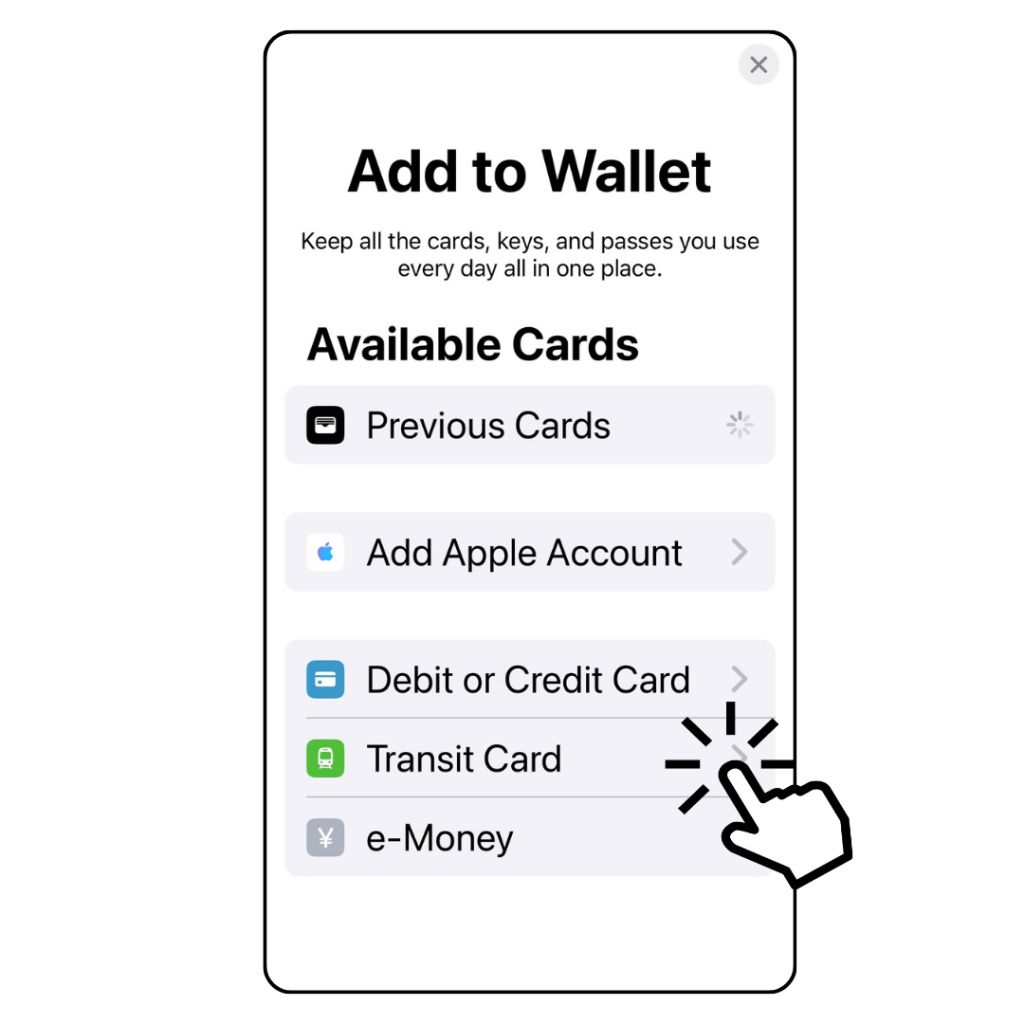
2. Choose Transit Card in Add to Wallet
Select “Transit Card” from the options available in the Add to Wallet section.
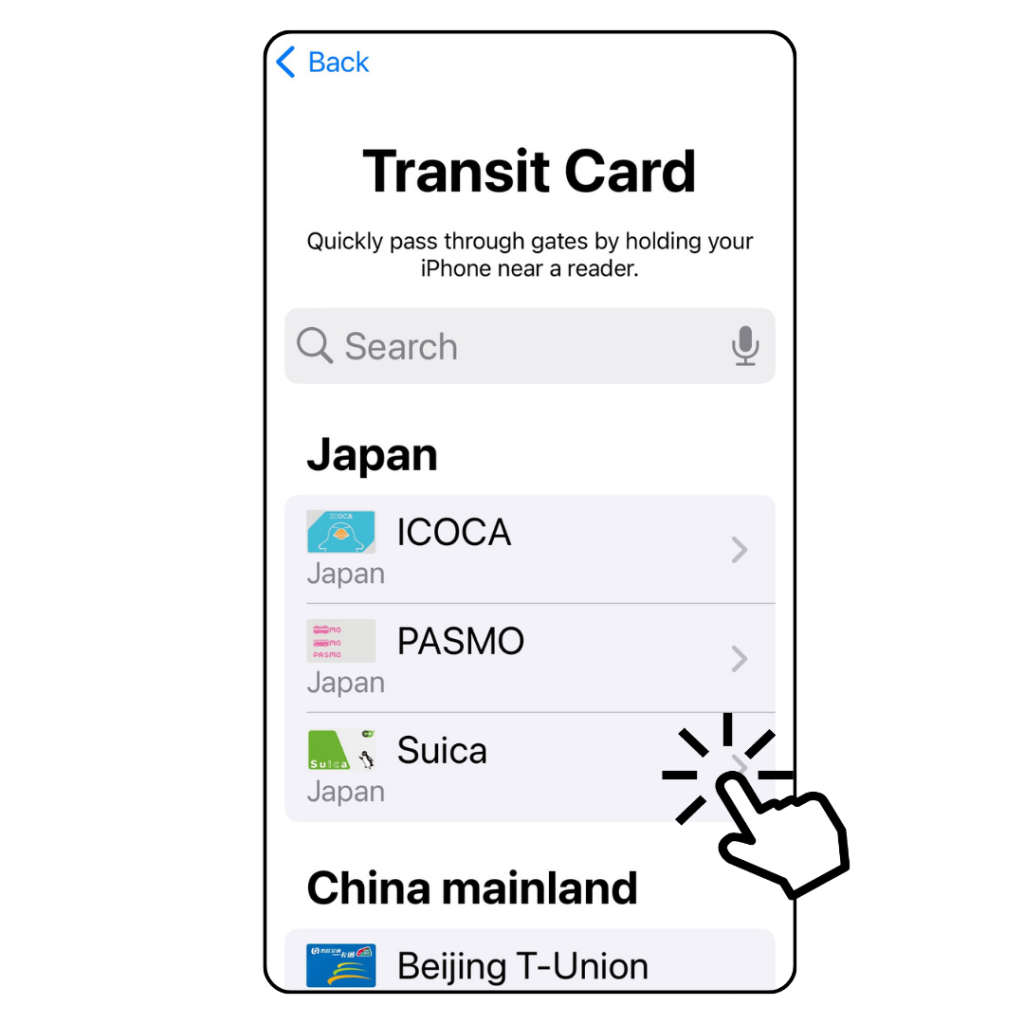
3. Choose Suica as your transit card
From the list of transit cards, select “Suica.”
4. Click Continue
Tap “Continue” when you see the Suica card face on the screen. Suica card face is on the screen.

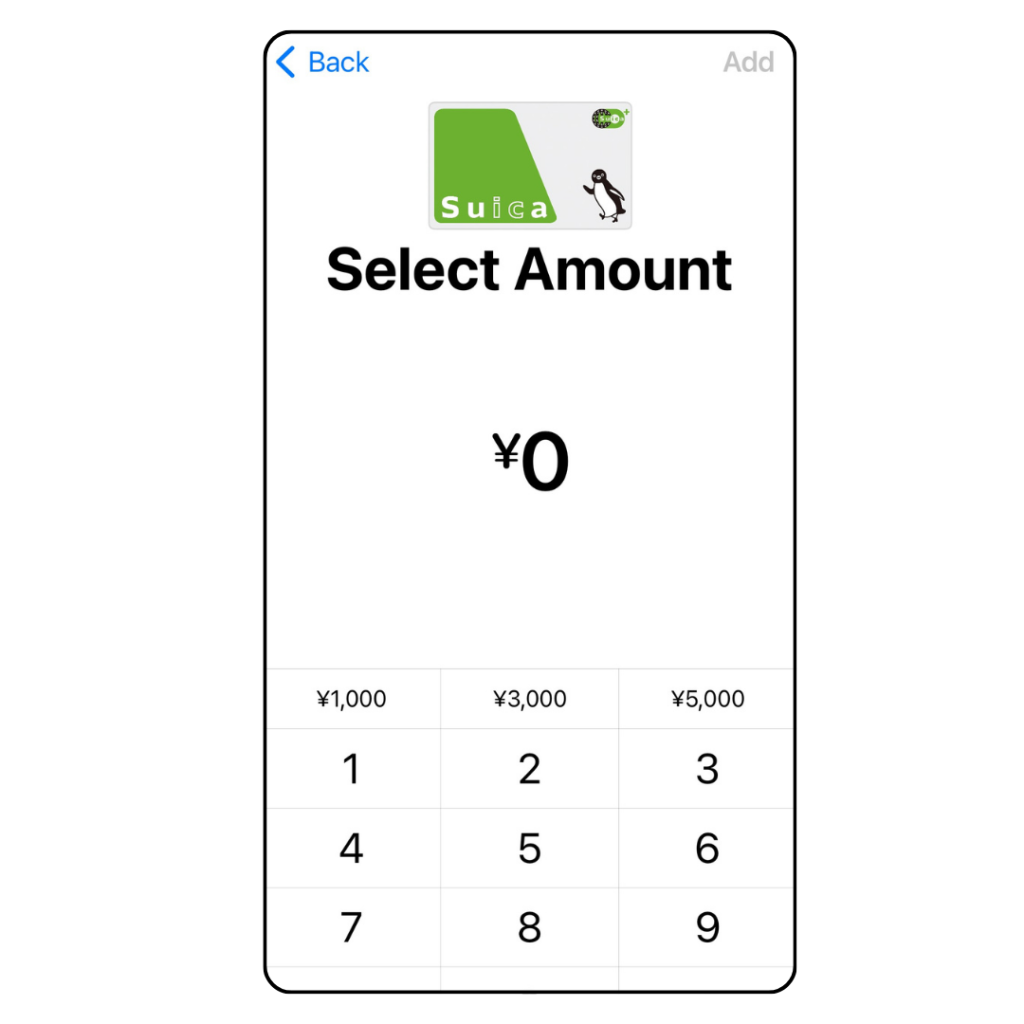
5. Select Amount
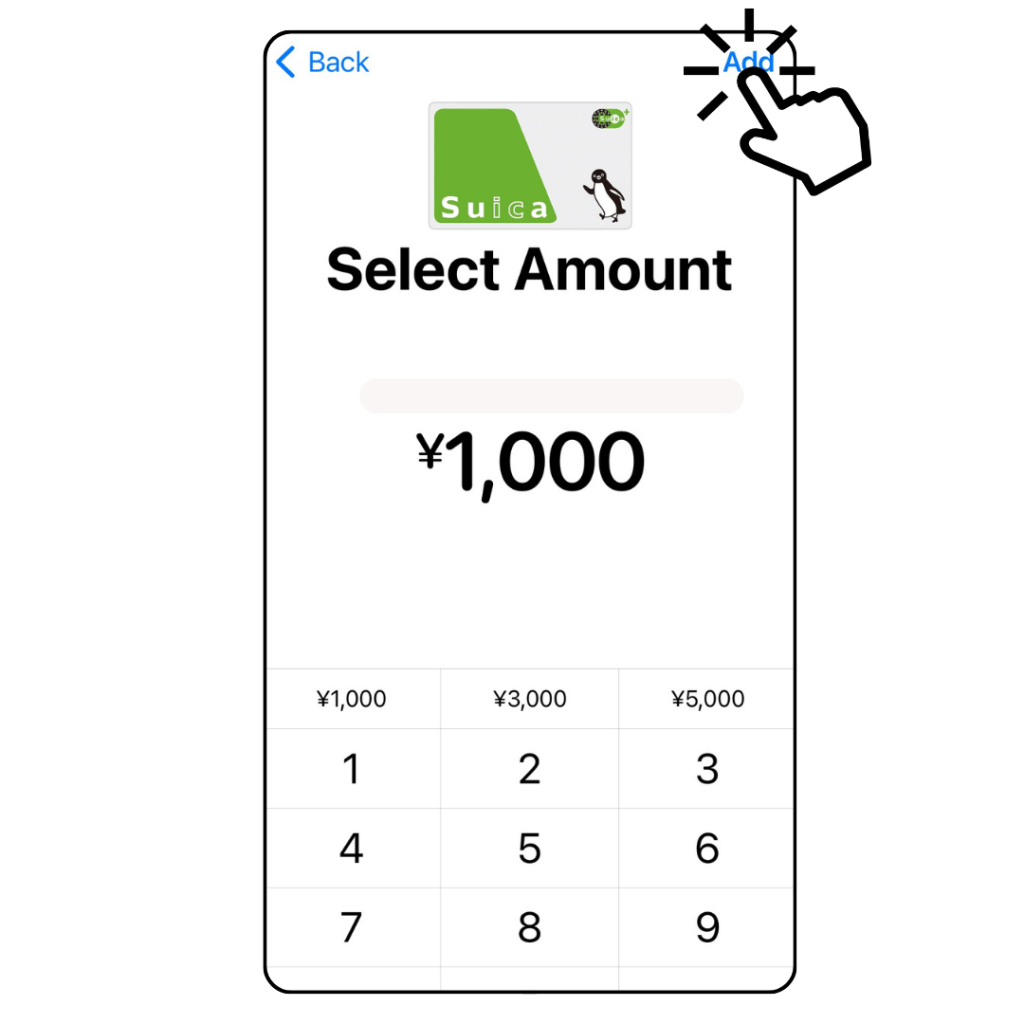
6. Click Add
Choose the amount you want to load onto your Suica card.
Common amounts are displayed for convenience.
Then tap “Add” to proceed to the payment stage into the Suica card in your Wallet App.
At this stage, the money is not transfered yet.
6. Previous Account?
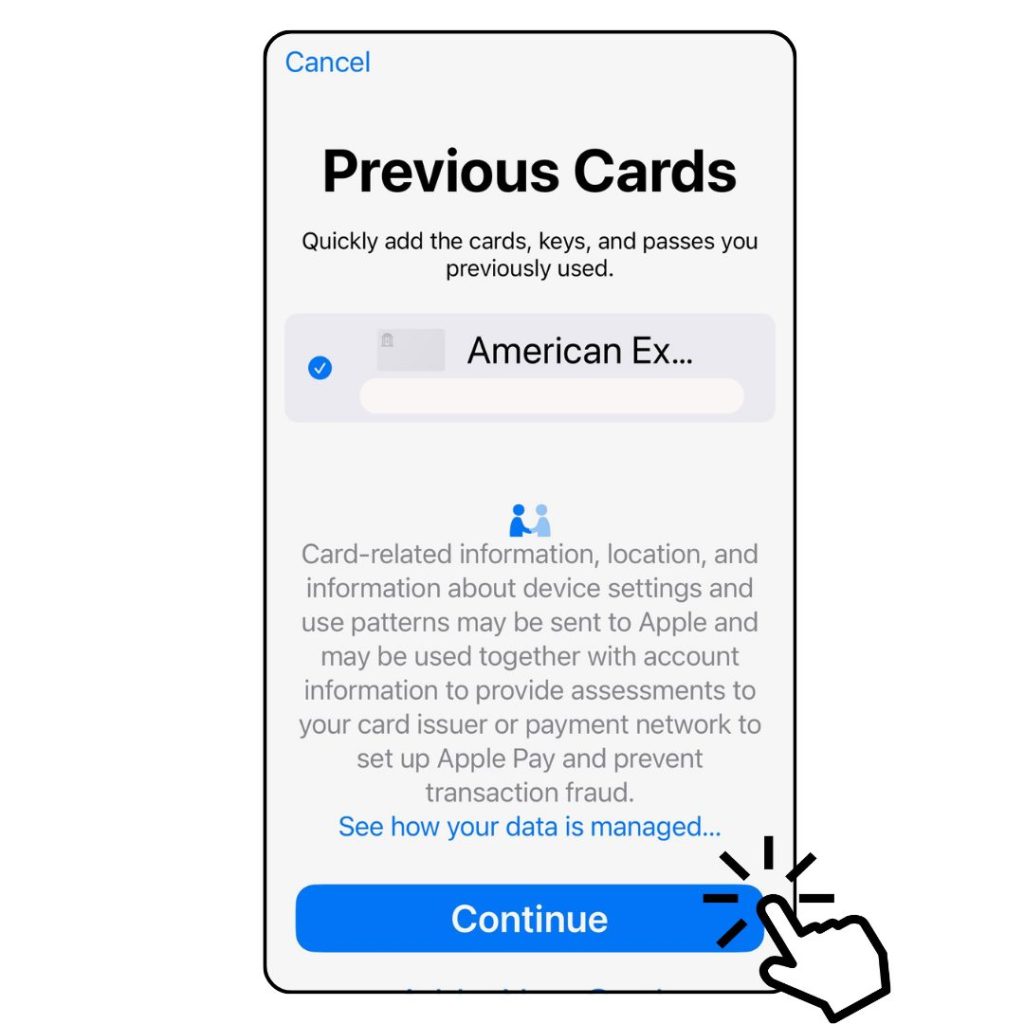
In this screen, if you have any credit cards registered in the Wallet tab, the screen like this shows.
If you do not have any, you will be required to add a new credit card on your Wallet App.
If you have the card registered previously, click ‘continue’.
At this stage, moeny will not be transfered yet even you contunie this page.
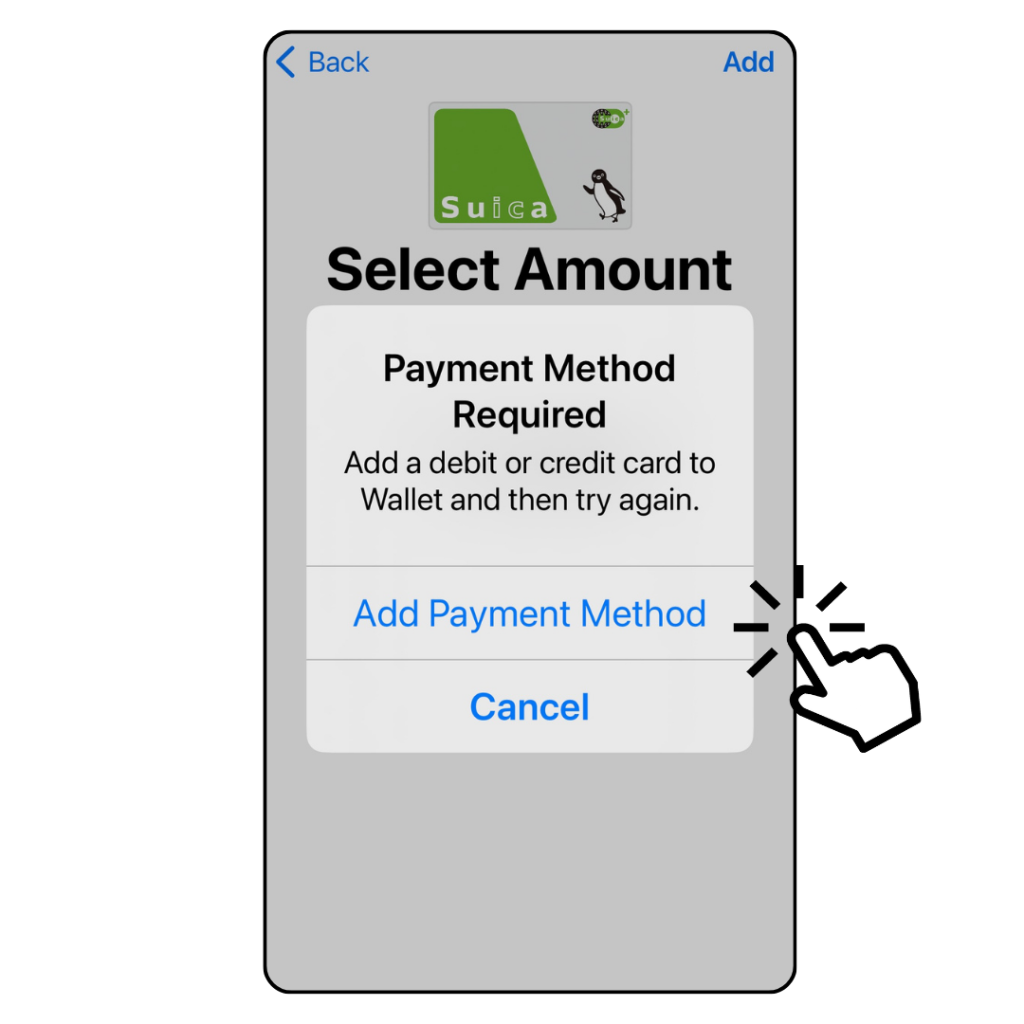
7. Add payment method
Add a payment method for your Suica. If you have already using the Wallet App, so you do not need to worry about adding credit card newly.
Then, in the next page, you choose the credit card to add the amount you chosen, you will have the amount into your Mobile Suica
8. Ready to use now!
Now you can use your mobile Suica with your iPhone!
It is easy to top it up when you need, just click the bottm green bar(入金チャージ), it is ‘Charge’ for your Suica.
You can safely use your credit card registered in your Wallet App

Mobile Suica is very useful for your life in Japan
How to Use Mobile Suica for Train Rides, Bus Rides, and Shopping:
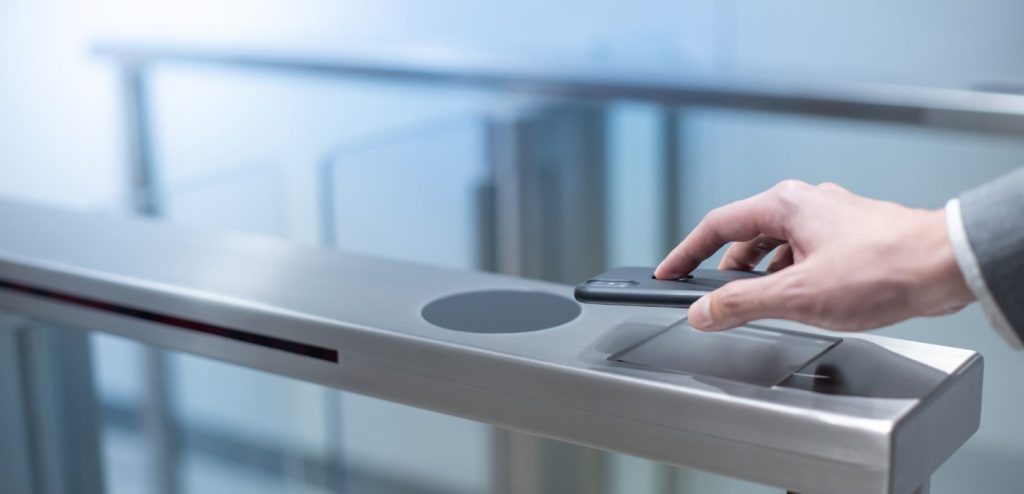
- Train Rides: Simply tap your smartphone on the IC card reader at the ticket gates when entering and exiting the train stations. Make sure your phone’s Suica balance is sufficient for the trip.
- Bus Rides: Tap your smartphone on the IC card reader located at the bus entrance. When you get off the bus, tap again on the reader at the exit to complete the transaction.
- Shopping: Many convenience stores, vending machines, and shops accept Suica as a form of payment. Look for the Suica logo or ask the cashier if Suica is accepted. To pay, tap your smartphone on the reader at the cashier.
Common Places Where Suica is Accepted:
- Train and subway stations across Japan.
- Buses in major cities and some regional areas.
- Convenience stores such as 7-Eleven, Lawson, and FamilyMart.
- Vending machines with the Suica logo.
- Many retail shops, supermarkets, and some restaurants.
Locations Where Suica Might Not Be Accepted:
- Some smaller or rural shops and restaurants.
- Certain regional trains and buses not integrated with the Suica system.
- Specific services or facilities that do not use IC card payment systems.
Frequently Asked Questions
Can foreigners use Mobile Suica?
- Yes, foreigners can use Mobile Suica. Tourists and residents can download the Mobile Suica app and set it up on their iPhones.
How much does it cost to use Mobile Suica in Japan?
- Issuing Mobile Suica on your phone is free. You only need to preload it with an amount of your choice. There is no deposit required as there is with physical Suica cards.
What is the difference between Suica and Welcome Suica?
- Suica: Physical card for general use, currently not being newly issued.
- Welcome Suica: A temporary card for tourists, valid for 28 days, with no deposit required. It is ideal for short-term visitors but not suitable for long-term residents.
- Mobile Suica: A virtual version of Suica that is free to issue on your smartphone, ideal for long-term residents due to its convenience and ease of use.
Can tourists use Mobile Suica?
- Yes, tourists can use Mobile Suica with thier iPhone.
What is Suica mobile payment?
- Suica mobile payment allows users to make payments using their smartphones at places where Suica is accepted. It works the same way as a physical Suica card, providing a contactless payment method for transportation and purchases.
Does Mobile Suica work throughout Japan?
- Mobile Suica is widely accepted in major cities and regions across Japan, including Tokyo, Osaka, and Kyoto. However, some rural areas or specific services may not accept Suica, so it’s always good to check ahead.
Troubleshooting Common Issues
Forgotten Password Recovery:
- If you forget your Mobile Suica password, you will need to reset it through the Mobile Suica app. This may require verification through your registered email address or phone number.
Recharging Issues:
- If you encounter problems recharging your Mobile Suica, ensure your credit card or payment method is correctly linked and has sufficient funds. You can also recharge at convenience stores or train station ticket machines.
How can I change the Suica App to Englihsh?
To change the Mobile Suica app to English, follow these steps:
- Check App Settings: Open the Suica app and look for any language settings within the app to switch to English.
- Adjust iPhone Language: Go to your iPhone’s settings, then General > Language & Region. Set English as the preferred language.
- Restart the App: Close and reopen the Suica app to see if it switches to English.
Can I use my Android phone?
- Your Android phone must support Osaifu-Keitai (Japanese mobile wallet) or have NFC functionality. This means the Android phone must be bought in Japan, as Android phones sold outside of Japan typically do not have the necessary NFC function. If you have a compatible Android phone, you can use Mobile Suica.
- On the Android phone, you should install mobile Suica on the GooglePay, this is the most simple way to install the mobile Suica on Android.
Can you see how to make Suica App on iphone with English?
- Ease of Issuance: Issuing new physical Suica cards is not possible, making Mobile
- Cost-Effective: Issuing Mobile Suica on your phone incurs no cost, making it a budget-friendly choice.
- Long-Term Use: Unlike Welcome Suica, which is valid for only 28 days and meant for short-term visitors, Mobile Suica is perfect for long-term residents in Japan.
- Installation on iPhone: Use the Wallet app to add Suica as a transit card by following simple steps, including adding a payment method.
- Using Mobile Suica: You can use Mobile Suica for train rides, bus rides, and shopping by tapping your smartphone on IC card readers.
- Common Acceptance Locations: Suica is widely accepted at train and subway stations, buses, convenience stores, vending machines, and many retail shops.
- Limited Acceptance Locations: Suica might not be accepted at some smaller or rural shops, certain regional trains, and specific services not integrated with the Suica system.
- Tourist Use: Tourists can easily use Mobile Suica on their smartphones by downloading and setting up the app.
- Troubleshooting: Common issues like forgotten passwords and recharging problems can be resolved through the Mobile Suica app or by ensuring your payment method is correctly linked.